After a long saturday in berlin I could write some facts about the talks and list all the news. But the gdd world tour is over and all speaker announced to publish the slides. So I will offer the not-complete list.
Continue reading
Author Archives: Christian Harms
Snow is falling – code puzzle
Code puzzles are fun and you can solve it with some lines of code. The code puzzle on snowisfalling.com is a page showing snow is falling up instead down. After reading the code, sleeping two nights without time to solve it, the simple solution is easy:
  init : function(law){
    String.prototype.reverse=function(){return this.split("").reverse().join("");}
    this.law = {};
    for (var k in law) { this.law[k.reverse()] = law[k]; };
Use compressed data directly – from ZIP files or gzip http response
Did you use compressing while using resources from your scripts and projects? Many data files are compressed to save disc space and compressed requests over the network saves bandwith.
This article gives some hints to use the “battery included” power of python for the handling of compressed files or use HTTP with gzip compression:
- reading log files as GZIP or uncompressed
- using files directly from ZIP- or RAR compression archive
- use gzip compressing while fetching web sites
reading GZip compressed log files
The most common use case for reading compressed files are log files. My access_log files are archived in an extra directory and can be easy used for creating statistics. This is done normally with zgrep/zless and other command line tools. But opening a gzip-compressed file with python is build-in and can be transparent for the file handling.
import gzip, sys, os

if len(sys.argv)<1:
    sys.exit()
try:
  fp = gzip.open(sys.argv[1])
  line = gzip.readline()
except IOError:
  fp = open(sys.argv[0])
  line = fp.readline()

while line:
  ...
The tricky part is the IOError line. If you open a plain text file with the GzipFile class it fails while reading the first line (not while calling the constructor).
You can use the bz2-module with the BZ2File constructor if you have bzip2-compressed files.
Reading a file directly from zip archive
If you need a british word list your linux can help (if the british dictionary is installed). If not you can get it from several sources. I choosed the zip-compressed file from pyxidium.co.uk and included it in a small python script.
Zip-files are a container format. You can put many files in it and have to choose which file you want to decompress from the ZIP-file. In the example I will fetch the ZIP achive into memory and unzip the file
en-GB-wlist.txt
directly.
import zipfile, os, StringIO, urllib

def openWordFile():
    #reading english word dictionary
    pathToBritishWords = "/usr/share/dict/british-english"
    uriToBritshWords = "http://en-gb.pyxidium.co.uk/dictionary/en-GB-wlist.zip"

    if os.path.isfile(pathToBritishWords):
        fp = file(pathToBritishWords)
    else:
        #fetch from uri
        data = urllib.urlopen(uriToBritshWords).read()
        #get an ZipFile object based on fetched data
        zf = zipfile.ZipFile(StringIO.StringIO(data))
        #read one file directly from ZipFile object
        fp = zf.open("en-GB-wlist.txt")
    return fp

#read all lines
words = openWordFile().readlines()

print "read %d words" % len(words)
If you want to read directly from a RAR file you have to install the rarfile module.
sudo easy_install rarfile
The module use the command line utility rar/unrar, but the usage is the same like the zipfile module.
import rarfile
rf = rarfile.RarFile("test.rar")
fp = rf.open(“compressed.txt”)
Use gzip compression while fetching web pages
The speed of fetching web pages has many parameters. To save the important parameter band width you should fetch http resources compressed. Every modern browser support this feature (see test on browserscope.org) and every webserver should be able to compress the text content.
Your HTTP client must send the HTTP header “Accept-Encoding” to offer the possibility for compressed content. And you have to check the response header if the server sent compressed content. A web server can ignore this request header!
import urllib2, zlib, gzip, StringIO, sys

uri = "http://web.de/index.html"
req = urllib2.Request(uri, headers={"Accept-Encoding":"gzip, deflate"})
res = urllib2.urlopen(req)
if res.getcode()==200:
    if res.headers.getheader("Content-Encoding").find("gzip")!=-1:
        # the urllib2 file-object dont support tell/seek, repacking in StringIO
        fp = gzip.GzipFile(fileobj = StringIO.StringIO(res.read()))
        data = fp.read()
    elif res.headers.getheader("Content-Encoding").find("deflate")!=-1:
        data = zlib.decompress(res.read())
    else:
        data = res.read()
else:
    print "Error  while fetching ..." % res.msg
    sys.exit(-1)

print "read %s bytes (compression: %s), decompressed to %d bytes" % (
    res.headers.getheader("Content-Length"),
    res.headers.getheader("Content-Encoding"),
    len(data))
As a developer I did not found the automatic support for gzip-enabled HTTP requests for HTTP clients in different libraries. And python dont offer the support build-in too. Copy/paste this lines in your next project or convert it in your favorite language and your HTTP request layer will become faster.
conclusion
One disadvantage: your software will consume some percent more cpu to decompress the data on-the-fly and will be slower on your local machine. Python use the c-binding to the zlib and is fast as any other component and in a network environment you can messure the benefit.
How many angry birds defeat how many pigs in google+?
Coding (in spare time) should be fun. Some times I change this with real gaming like the angry birds on google+. But after some days of scoring agains my friends I opened the HttpFox plugin and looked behind the normal interface.
And I got a view of the JSON-data files from the angry birds game. Every level is offered in a single json-file and has count for the 1-, 2- or 3-star assessment. With some python scripting I fetched all level files from the app enginge instance of angry birds.
import json, urllib
for level in range(1,9):
  for stage in range(1, level <6 and 22 or 16):
    #url is shorted to prevent copy/paste kiddies ...
    lvUrl = "https://r3138-dot-xxxx.appspot.com/cors/fowl/json/Level%d-%d.json" % (level, stage)
    data = json.loads(urllib.urlopen(lvUrl).read())
    print "You need %s points for 3 stars in level %d-%d." % (
               data["scoreGold"], level, stage)
That's was so easy - all work was done.
And the answer to the question (for all 8 levels and the Chrome level):
 652 birds are availbale to defeat the 911 pigs!
So I can add some other funny statistics:
|
And if you ever need to know how many points are the limits for 3-stars:
Complete 3-star limit table for angry birds on google+
Resize your browser to get the complete table!
| 1 / 9 / 17 | 2 / 10 / 18 | 3 / 11 / 19 | 4 / 12 / 20 | 5 / 13 / 21 | 6 / 14 / 22 | 7 / 15 / 23 | 8 / 16 / 24 | |
|---|---|---|---|---|---|---|---|---|
| Level1 1-8 | 3 birds vs 1 pig gold: 32000 |
5 birds vs 4 pigs gold: 60000 |
4 birds vs 2 pigs gold: 41000 |
4 birds vs 1 pig gold: 28000 |
4 birds vs 5 pigs gold: 64000 |
4 birds vs 2 pigs gold: 35000 |
4 birds vs 3 pigs gold: 45000 |
4 birds vs 4 pigs gold: 50000 |
| 9 - 16 | 4 birds vs 3 pigs gold: 50000 |
5 birds vs 2 pigs gold: 55000 |
4 birds vs 4 pigs gold: 54000 |
4 birds vs 3 pigs gold: 45000 |
4 birds vs 3 pigs gold: 47000 |
4 birds vs 9 pigs gold: 70000 |
4 birds vs 3 pigs gold: 41000 |
5 birds vs 4 pigs gold: 64000 |
| 17 - 21 | 3 birds vs 3 pigs gold: 53000 |
5 birds vs 4 pigs gold: 48000 |
4 birds vs 1 pig gold: 35000 |
5 birds vs 2 pigs gold: 50000 |
8 birds vs 3 pigs gold: 75000 |
Sum of birds: 91 Sum of pigs: 66 |
||
| Level2 1-8 | 4 birds vs 7 pigs gold: 60000 |
4 birds vs 5 pigs gold: 60000 |
5 birds vs 11 pigs gold: 102000 |
4 birds vs 4 pigs gold: 50000 |
4 birds vs 4 pigs gold: 80000 |
3 birds vs 4 pigs gold: 62000 |
4 birds vs 3 pigs gold: 50000 |
3 birds vs 5 pigs gold: 53000 |
| 9 - 16 | 4 birds vs 1 pig gold: 28000 |
3 birds vs 3 pigs gold: 40000 |
4 birds vs 3 pigs gold: 69000 |
6 birds vs 2 pigs gold: 60000 |
4 birds vs 4 pigs gold: 70000 |
4 birds vs 4 pigs gold: 50000 |
5 birds vs 5 pigs gold: 50000 |
3 birds vs 3 pigs gold: 62000 |
| 17 - 21 | 3 birds vs 3 pigs gold: 36000 |
4 birds vs 5 pigs gold: 60000 |
3 birds vs 2 pigs gold: 47000 |
3 birds vs 4 pigs gold: 52000 |
6 birds vs 5 pigs gold: 75000 |
Sum of birds: 83 Sum of pigs: 87 |
||
| Level3 1-8 | 3 birds vs 7 pigs gold: 63000 |
4 birds vs 6 pigs gold: 50000 |
3 birds vs 4 pigs gold: 57000 |
3 birds vs 4 pigs gold: 39000 |
3 birds vs 9 pigs gold: 108000 |
3 birds vs 9 pigs gold: 60000 |
4 birds vs 7 pigs gold: 55000 |
4 birds vs 5 pigs gold: 75000 |
| 9 - 16 | 3 birds vs 7 pigs gold: 65000 |
4 birds vs 6 pigs gold: 50000 |
4 birds vs 4 pigs gold: 50000 |
5 birds vs 3 pigs gold: 50000 |
3 birds vs 4 pigs gold: 40000 |
4 birds vs 5 pigs gold: 50000 |
3 birds vs 4 pigs gold: 55000 |
3 birds vs 4 pigs gold: 70000 |
| 17 - 21 | 4 birds vs 5 pigs gold: 68000 |
5 birds vs 7 pigs gold: 85000 |
3 birds vs 5 pigs gold: 63000 |
5 birds vs 9 pigs gold: 110000 |
7 birds vs 9 pigs gold: 107000 |
Sum of birds: 80 Sum of pigs: 123 |
||
| Level4 1-8 | 3 birds vs 3 pigs gold: 62000 |
3 birds vs 8 pigs gold: 56000 |
3 birds vs 3 pigs gold: 55000 |
4 birds vs 4 pigs gold: 60000 |
4 birds vs 10 pigs gold: 93000 |
4 birds vs 5 pigs gold: 57000 |
5 birds vs 4 pigs gold: 70000 |
4 birds vs 3 pigs gold: 50000 |
| 9 - 16 | 4 birds vs 3 pigs gold: 40000 |
4 birds vs 4 pigs gold: 45000 |
3 birds vs 5 pigs gold: 75000 |
4 birds vs 6 pigs gold: 94000 |
4 birds vs 4 pigs gold: 76000 |
6 birds vs 10 pigs gold: 85000 |
5 birds vs 4 pigs gold: 80000 |
4 birds vs 8 pigs gold: 77000 |
| 17 - 21 | 3 birds vs 1 pig gold: 30000 |
5 birds vs 3 pigs gold: 83000 |
3 birds vs 4 pigs gold: 50000 |
5 birds vs 10 pigs gold: 107000 |
6 birds vs 7 pigs gold: 85000 |
Sum of birds: 86 Sum of pigs: 109 |
||
| Level5 1-8 | 3 birds vs 7 pigs gold: 55000 |
3 birds vs 5 pigs gold: 50000 |
4 birds vs 4 pigs gold: 80000 |
4 birds vs 7 pigs gold: 70000 |
4 birds vs 7 pigs gold: 65000 |
4 birds vs 7 pigs gold: 85000 |
5 birds vs 5 pigs gold: 85000 |
5 birds vs 6 pigs gold: 80000 |
| 9 - 16 | 4 birds vs 7 pigs gold: 70000 |
4 birds vs 5 pigs gold: 50000 |
4 birds vs 5 pigs gold: 63000 |
4 birds vs 8 pigs gold: 72000 |
3 birds vs 4 pigs gold: 60000 |
3 birds vs 3 pigs gold: 58000 |
4 birds vs 4 pigs gold: 60000 |
4 birds vs 7 pigs gold: 113000 |
| 17 - 21 | 7 birds vs 7 pigs gold: 100000 |
5 birds vs 13 pigs gold: 110000 |
5 birds vs 3 pigs gold: 115000 |
4 birds vs 8 pigs gold: 97000 |
5 birds vs 15 pigs gold: 175000 |
Sum of birds: 88 Sum of pigs: 137 |
||
| Level6 1-8 | 4 birds vs 7 pigs gold: 58000 |
4 birds vs 4 pigs gold: 72000 |
4 birds vs 5 pigs gold: 63000 |
4 birds vs 4 pigs gold: 80000 |
3 birds vs 5 pigs gold: 65000 |
3 birds vs 4 pigs gold: 78000 |
4 birds vs 7 pigs gold: 115000 |
4 birds vs 8 pigs gold: 88000 |
| 9 - 15 | 3 birds vs 8 pigs gold: 100000 |
6 birds vs 3 pigs gold: 85000 |
3 birds vs 7 pigs gold: 100000 |
5 birds vs 12 pigs gold: 100000 |
5 birds vs 6 pigs gold: 80000 |
5 birds vs 7 pigs gold: 92000 |
5 birds vs 14 pigs gold: 120000 |
Sum of birds: 62 Sum of pigs: 101 |
| Level7 1-8 | 4 birds vs 7 pigs gold: 120000 |
3 birds vs 15 pigs gold: 135000 |
4 birds vs 7 pigs gold: 64000 |
4 birds vs 4 pigs gold: 80000 |
5 birds vs 4 pigs gold: 80000 |
4 birds vs 9 pigs gold: 75000 |
4 birds vs 10 pigs gold: 100000 |
5 birds vs 7 pigs gold: 90000 |
| 9 - 15 | 5 birds vs 13 pigs gold: 130000 |
5 birds vs 9 pigs gold: 100000 |
4 birds vs 11 pigs gold: 98000 |
4 birds vs 6 pigs gold: 85000 |
4 birds vs 5 pigs gold: 60000 |
5 birds vs 5 pigs gold: 60000 |
5 birds vs 13 pigs gold: 150000 |
Sum of birds: 65 Sum of pigs: 125 |
| Level8 1-8 | 4 birds vs 12 pigs gold: 100000 |
4 birds vs 7 pigs gold: 60000 |
5 birds vs 8 pigs gold: 120000 |
4 birds vs 8 pigs gold: 102000 |
5 birds vs 6 pigs gold: 80000 |
5 birds vs 7 pigs gold: 105000 |
4 birds vs 14 pigs gold: 145000 |
6 birds vs 7 pigs gold: 110000 |
| 9 - 15 | 4 birds vs 7 pigs gold: 140000 |
5 birds vs 6 pigs gold: 120000 |
5 birds vs 7 pigs gold: 100000 |
5 birds vs 7 pigs gold: 105000 |
6 birds vs 5 pigs gold: 145000 |
4 birds vs 5 pigs gold: 85000 |
5 birds vs 8 pigs gold: 140000 |
Sum of birds: 71 Sum of pigs: 114 |
| Levelchrome 1-7 | 4 birds vs 5 pigs silver: 65000 eagle: 100 gold: 75000 |
3 birds vs 7 pigs silver: 85000 eagle: 100 gold: 92000 |
3 birds vs 6 pigs silver: 65000 eagle: 100 gold: 73000 |
4 birds vs 8 pigs silver: 80000 eagle: 100 gold: 87000 |
4 birds vs 8 pigs silver: 78000 eagle: 100 gold: 85000 |
4 birds vs 8 pigs silver: 57000 eagle: 100 gold: 64000 |
4 birds vs 7 pigs silver: 78000 eagle: 100 gold: 85000 |
Sum of birds: 26 Sum of pigs: 49 |
Which Levels in Angry Birds have the Chrome Ball to unlock the Google Chrome Levels?
More simple task is to detect where the chrome logos are hidden to active the Chrome level - more detailed features are available on angrybirdsnest.com.
- Level1-16
- Level1-18
- Level1-20
- Level2-4
- Level2-20
- Level3-7
- Level3-14
- Level4-4
- Level4-13
- Level5-5
- Level6-9
- Level6-13
- Level7-8
- Level8-2
Where are invisible blocks on angry birds on google+ ?
And in the higher levels I found a entry named "BREAKABLE_STATIC_BLOCK_INVISIBLE" in the following levels:
- Level7-3
- Level7-4
- Level7-7
- Level7-8
- Level7-9
- Level7-11
- Level8-3
- Level8-4
- Level8-15
What fruits are used in the angry birds levels?
- Level2-10: STRAWBERRY
- Level2-14: WATERMELON
- Level2-19: BANANA
- Level3-21: DONUT
- Level4-11: HAM
- Level5-6: BANANA
- Level5-12: STRAWBERRY + HAM
- Level5-13: WATERMELON + APPLE + BANANA + HAM + DONUT
- Level7-4: STRAWBERRY + BANANA + WATERMELON + APPLE + DONUT + HAM
- Level7-13: APPLE + HAM + WATERMELON + STRAWBERRY + BANANA
- Level8-13: WATERMELON + STRAWBERRY + BANANA
And I have no idea when the extended levels are available for playing - I was only looking in the json-files while playing. This is not very releated to the normal coding content but a funny result with some old-scool-scriping.
basic rules for code readability and the if statement
Some reader knows my preference for programming languages like python or javascript. One reason is the readability (yes, this is possible with many languages except brainfuck or whitespace). Once we write some lines of code, but other developer has to read the lines of code several times while code reviews, debugging or refactoring.
Code should be readable like your normal language. I will start with a funny condition.
if ( !notOk != false ) {
  userObj.ask();
}
This is only confusing and you will never formulate this expression in a natural language. With several steps this term can be simply resolved:
-
( !notOk != false )
-
( !notOk == true )
-
( !notOk)
- now you should rethink the variable name:
isOk = !notOk
And the result is more readable:
if ( isOk ) {
  userObj.ask();
}
if – if – if trees
After removing some comments and other code lines this is an other typical coding style:
if ( A ) {
  if ( !B ) {
    if ( C ) {
      f();
    }
  }
}
There shorter variant for clever coder looks like this line:
if ( A ) if ( !B ) if ( C ) { f(); }
But using logical operators the line is more readable:
if ( A && !B && C ) { f(); }
If you refactor a function with some levels of if-statements try to use logical operators instead of the if – trees. But it should be readable like a natural language.
Be careful while using & and/or comparing integer! Single & is in most languages the bit-wise AND operator, check the examples:
ANSI-C:
1 & 2 = 0
1 && 2 = 1 //it’s true, and true is 1

JavaScript:
1 & 2 = 0
1 && 2 = 2 // the first is true, so return the second

python:
1 & 2 = 0
1 and 2 = 2 # like the JavaScript variant

Java:
1 & 2 = 0
1 && 2 // not valid with int
The if – true – false assignment function
function isNameSet(name) {
  if (name===null || name==="") {
    return false;
  } else {
    return true;
}
Sometimes this construct is hidden in many lines of code and can found in other languages too. But in this simple form the more elegant solution is easy to understand:
function isNameSet(name) {
  return !(name==null || name=="");
}
But you only want to check it the value of name is set. Many languages like Javascript (read the all about types by Matthias Reuter) can convert the value directly into a truthy value (read more on The Elements of JavaScript Style by Douglas Crockford.
function isNameSet(name) {
  return name;
}
After reducing the function to nothing you can remove it and use the string-value directly in a condition.
if (!name) {
  name = window.prompt("What’s your name?");
}
use the ternary operator (carefully)
function genderStr(gender) {
  if ( gender == "m" ) {
    return "male";
  } else {
    return "female";
  }
}
The function can be generalized:
function trueFalseStr(cond, trueStr, falseStr) {
  if (cond) {
    return trueStr;
  } else {
    return falseStr;
  }
}
Or you can use the ternary operator (avaible in many languages):
return (gender == "m")? "male" : "female"
With python (since v2.5) the following term is available instead of the “?” operator:
return "male" if gender == "m" else "female"
An other variant works with the example values and is readable too:
return (gender=="m") and "male" or "female"
yoda conditions
I offered in a older arctile the helpful yoda conditions. This simple example show the difference:
if (value = 42) {
   ...
}
For preventing assignment in a condition (and get a compiler warning) use the constant first:
if (42 = value) {
   ...
}
I have to withdraw in the content of readablitiy my suggestion for yoda conditions!
many if statements for mapping values
I found a nice thread on stackoverflow.com:
function norm(v) {
  size = 7;
  if ( v > 10 ) size = 6;
  if ( v > 22 ) size = 5;
  if ( v > 51 ) size = 4;
  if ( v > 68 ) size = 3;
  if ( v > 117 ) size = 2;
  if ( v > 145 ) size = 1;
  return size;
}
There are many variants, the one with JavaScript with ternary operators is not readable:
function norm(v) {
  return return v > 145 ? 1 : v > 117 ? 2 : v > 68 ? 3 : v > 51 ? 4 : v > 22 ? 5 : v > 10 ? 6 : 7;
}
Or the calculated variant in ANSI C. It works only if a boolean value can converted to integer.
int norm(int x){
  return 7 - (x>10) - (x>22) - (x>51) - (x>68) - (x>117) - (x>145);
}
If would change the limits for a more readable variant (in python):
def norm(v):
    if   v< 11: size=7
    elif v< 23: size=6
    elif v< 52: size=5
    elif v< 69: size=4
    elif v
And now the variant can written as a list comprehension (ok, not better readable, but funny):
def norm(v):
    return 1+len([x for x in [11, 23, 52, 69, 118, 146] if v
my conclusion
Try to read your code as a story. It should have an introduction and then things should happen step-by-step. For deeper information try to learn more about clean code and check out clean code books on amazon
comparing language performance and memory usage
With the small coding contest some weeks ago we got many comments and it’s worth to make a conclusion for the solutions in different languages. What language is easier to write, has better memory usage or better performance?
To clarify the question:
Remove duplicate lines from a file
We have a text file with 13 Million entries, all numbers in the range from 1.000.000 to 100.000.000. Each line has only one number. The file is unordered and we have about 1% duplicate entries. Remove the duplicates.
Be efficient with the memory usage and / or find a performant solution. The script should be started with the filename and linenumber and print the result to stdout.
benchmark preparation
First I generate the random numbers as test files with a simple python script. All tests will started with bench.py over all test files. See the sourcecode on github.com.
The command line tool /usr/bin/time can detect the cpu and memory consumption. This will be started as a sub process. After each run the user time, system time and maximum memory usage will saved. The result is stored into a JavaScript Object for the highchart. You can see the charts in the middle of this article.
Feel free to add new solutions and make some improvements.
first solution: sorting the numbers
The first solution in the comments was sorting all numbers. The expected memory usage should be 13.000.000 * 4 byte (100.000.000 fits into 32bit integers) if the sorting algorithm is not using an extra array for swapping. The average case effort for the sorting algorithm (quicksort or merge sort) is O(n + log n).
The command line tool sort can do this:
sort -u rand_numbers.txt > unique_numbers.txt
A small optimization with
sort
is comparing alpha-numerical instead string. It will use less memory:
sort -u -n rand_numbers.txt > unique_numbers.txt
The same solution in c should be compare-able with the sort-command. But I could not find the exact sort algorithm behind the method qsort. The implementation of standard qsort method could be mergesort, partition-exchange sort or quicksort and the memory usage will be higher than the pure memory amount for an array of integer.
solve_qsort.c
int main(int argc, char*argv[]) {

  char line[100];
  int i=0, last;
  FILE *fp = fopen(argv[1], "r");
  int count = (int)atoi(argv[2]);
  //allocating the size for the n values
  int32_t *digits = (int32_t *)malloc(count * sizeof(int32_t));

  // reading the lines, convert into an int, push into array
  while (fgets(line, 100, fp)) {
    digits[i++] = (int32_t)atoi(line);
  }
  fclose(fp);

  //sort the complete array
  qsort(digits, count, sizeof(int), compare);

  //Print all entries, ignoring doubles
  last = -1;
  for (i=0; i<count; i++) {
    if (last!=digits[i]) printf("%d\n", digits[i]);
    last = digits[i];
  }
}
This example is simple and not optimized, the same solution in python is not surprising (but shorter):
solve_number_sort.py
last = ""
for n in sorted(open(sys.argv[1])):
    if last != n:
        sys.stdout.write( n )
    last = n
This simple python version sort the input file as strings and print the values (sys.stdout.write is faster than the print method!). Converting the input file into an integer array will save memory usage. The result files will have a large diff because sorting as numbers or as string has different results.
solve_number_sort.py
values = map(int, open(sys.argv[1]))
values.sort()

last = 0
for n in values:
    if last != n:
        sys.stdout.write("%d\n" % n)
    last = n
benchmark result of sorting
In the charts you can see the O(n*log n) execution time. I separated the user and system time to clarify the algorithm calculation time vs. the system reading time.
The non-linear computing time results of the randomized entries in the test files.
limiting the memory usage
The sort command can split the input array into small chunks (for sorting), save it to disk and merge it with limited memory usage. The command line tool
ulimit -d <n>
limits the memory for all processes and sort use temporary files. But I chose the build-in parameter from the sort command with the
--buffer-size=SIZE
option.
sort -u -n -S 20M rand_numbers.txt
After successful testing I the built an memory limited sorting variant with python as a second example. The magic merge-component can be found in the module heapq. It offers the functionality to merge a list of open file iterators with the pre-sorted chunks.
merge_sort.py
import sys, tempfile, heapq
limit = 40000
def sortedFileIterator(digits):
    fp = tempfile.TemporaryFile()
    digits.sort()
    fp.write("\n".join(map(lambda x:str(x), digits)))
    fp.seek(0)
    return fp

iters = []
digits = []
for line in file(sys.argv[1]):
    digits.append(int(line.strip()))
    if len(digits)==limit:
        iters.append(sortedFileIterator(digits))
        digits = []
iters.append(sortedFileIterator(digits))

#merge all sorted ranges and filter doubles
oldItem = -1
for sortItem in heapq.merge(*iters):
    if oldItem != sortItem:
        print sortItem.strip()
    oldItem = sortItem
The both constant lines in the chart are the two examples with constant memory usage.
remove duplicates with hashmap
The second solution simply put all entries into a hashmap. The values be will used as keys and the data structure will remove the duplicate entries automatically. This can be seen in the perl example.
Some languages offers a set - this data structure stores only the unique keys without a value. The point of interest while benchmarking will be the memory usage for the “easy to use” build-in data structure for millions of integers.
perl command line
perl -lne'exists $h{$_} or print $h{$_}=$_'
solve_set.py
for n in set(open(sys.argv[1])):
    sys.stdout.write( n )
solve_set.lua
local set = {}
for n in io.lines(arg[1]) do
    if not set[n] then
        print(n)
        set[n] = true
    end
end
All solutions can be written in short time and will work. But the memory usage is terrible! The solutions needs 10 times of memory than the raw integer array. And the normal effort for using a hashmap with O(n) (set and get for n million in this case) is not correct. The “brute force inserting” keys into a hashmap will trigger the reorganisation of the bucket tables of the hashmap data structure! You can see this in the memory usage chart.
Using a bitarray instead a hashmap
The limits in the problem description offers a more elegant solution. The raw memory usage for 13 million 32-bit integer is ~49MB. Mapping all integers from 1 million to 100 million to the bit position (in linear memory) will use ~ 11MB (99 million bits / 8). So the memory usage for the bitarray will be lower and constant. And the computation for the very short map function will be short.
solve_bittarray.c
int main(int argc, char*argv[]) {

  char line[100];
  const minValue = 1000000;
  const maxValue = 100000000;
  char *bitarray = (char *)malloc((maxValue - minValue) / 8);
  FILE *fp = fopen(argv[1], "r");

  int pos;

  while (fgets(line, 100, fp)) {
    pos = atoi(line);
    if (!(bitarray[(pos-minValue)>>3] & 1<<(pos%8))) {
      printf("%d\n", pos);
      bitarray[(pos-minValue)>>3]|=(1<<(pos%8));
    }
  }
  fclose(fp);
  return 0;
}
We got a python solution with the module bitarray. If you dont have the module bitarray you have to install it. On the default ubuntu installation you need the python-dev and the setuptools packages. The bitarray module is available with easy_install after successful package installlation.
sudo apt-get install python-dev python-setuptools
sudo easy_install bitarray
The python solution is short, but the execution time is much longer than the c variant.
solve_bitarray.py
import sys, bitarray
minValue = 1000000
maxValue = 100000000
bits = bitarray.bitarray(maxValue-minValue+1)

for line in file(sys.argv[1]):
   i = int(line)
   if not bits[i - minValue]:
       bits[i - minValue] = 1
       sys.stdout.write(line)
Using mmap instead of normal fileio
A co-worker rated the file access higher than the computation time and offered a variant with mmap. The mmap function maps the input file into memory and you can iterate over it as a byte array. Because the parsing part of integers is easy the variant should be compareable with the bitarray c variant.
https://github.com/ChristianHarms/uc_sniplets/blob/master/no_duplicates/solve_nmap_bitmap.c
The memory usage for the bittarray-mmap variant will increase because the command line tool recognize the mapped memory as process memory usage.
conclusion
The bitarray solution has constant, low memory usage and fast execution time. It will only work because the available numbers are limited in range.
Using hashmap / set solutions can result in massive memory usage.
Sorting the input entries is the only one solution with the possibility to work with limited memory.
Find more about language performance with the "c++ / go / java / scala" language performance benchmark by google on readwriteweb.com.
create optimized wordlist data structures for mobile webapps
John Resig (creator and lead developer of jQuery) has published two interesting articles about data structure for a lookup to a huge wordlist (dictionary lookups and trie performance). Read in his articles about all the variants and preconditions.
I implemented six variants for the data structure (started with simple String search, Array to Trie) and benchmarked them to find the best solution. But let’s start with the rules:
1. loading time
The data structure should be as short as possible and available as an JavaScript file from a CDN. I created the complete data variants with python and uploaded the files on the google app engine (caching header and gzip as default).
2. memory usage
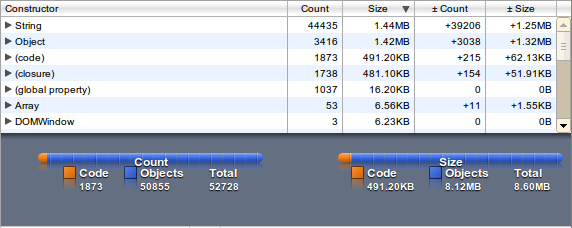
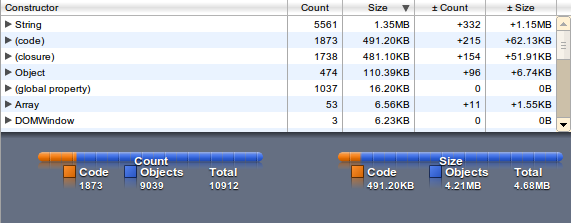
You can transfer a compressed data structure and extract it in the client. This can double your memory usage. Limit and test the memory usage – it should run on mobile devices with limited memory and cpu. I added the heap snapshots from the chrome developers tools to get the usage in an browser (John does it with node.js).
3. fast access
Find the existence of given word (or only his word stem) in the wordlist – the function for searching have to be benchmarked. I included an interactive page with loading the data files and a JSLitmus benchmark.
wordlist = ["works", "worksheet", "tree"];
findWord("worksheet")=="worksheet"
findWord("workshe")=="works"
findWord("workdesk")==false
4. test data
I used the default wordlist available on every linux system (
/usr/share/dict/
). The English wordlist contains 74137 unique words (filter out 1-letter, with apostrophe and lowercased) – the German wordlist has 327314 words. I chose 100 words containing / not containing in the list for benchmarking the access speed.
wordlist as a String
The shortest variant is putting the complete wordlist as a plain string in the loader.
words.load("String", "aah aahed aahing aahs aal zyzzyvas zzz");
filesize for English wordlist: 660 kB (gzip: 195 kB) – loading time: 20ms
filesize for German wordlist: 4223 kB (gzip: 857 kB)
findInString: function (word) {
    var data = this.data.String;
    while (word) {
        if (data.indexOf(word) !== -1) {
            return word;
        }
        word = word.substring(0, word.length - 1)
    }
    return false;
}
Wow, searching a non-existing word with
String.indexOf
is quite expensive!
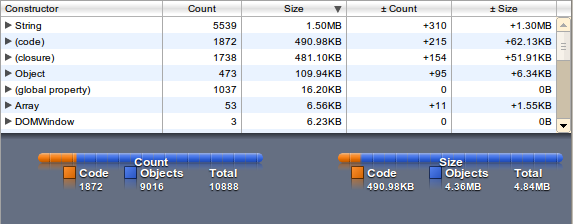
The memory usage (1.3 MB) is factor 2 then the plain file size (650 kB) because the JavaScript String is using utf-16.
wordlist as plain Array
For a better search performance we can split the wordlist on server side and offer the split up wordlist (splitting in client side will double the memory usage).
words.load("Array", ["aah","aahed","aahing","aahs","aal","zyzzyvas","zzz"]);
filesize for English wordlist: 805 kB (gzip: 200 kB) – loading time: 42ms
filesize for German wordlist: 4862 kB (gzip: 876 kB)
Searching in a sorted Array is simple binary search with O(log n).
findInArray: function (word) {
    var data = this.data.Array;
    var i = Math.floor(data.length / 2);
    var jump = Math.ceil(i / 2);
    while (jump) {
        if (data[i] === word) return word;
        i = i + ((data[i] < word) * 2 - 1) * jump;
        jump = (jump === 1) ? 0 : Math.ceil(jump / 2);
    }
    if (word.indexOf(data[i - 1]) === 0) return data[i - 1];
    return (word.indexOf(data[i]) === 0) ? data[i] : "";
}
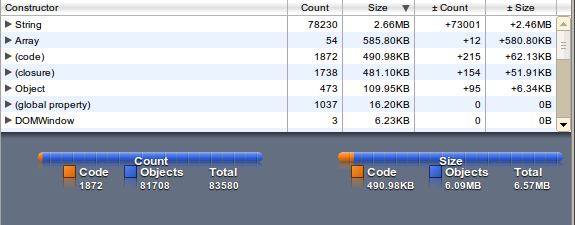
The memory usage is factor 5 (String and Array) than the file size.
wordlist as Hashmap
Because binary search with many items is more expensive than key-access we can use a hashmap (or a native JavaScript Object). Accessing should be optimized and with stripping the " from ASCII key-names the file size is not longer than the Array variant.
words.load("Hashmap", {zzz:1,aal:1,aahed:1,aah:1,aahing:1,aahs:1,zyzzyvas:1});
filesize for English wordlist: 797 kB (gzip: 325 kB) - loading time: 96ms
filesize for German wordlist: 5302 kB (gzip: 1804 kB)
Accessing the words in a hasmap is O(1), searching the word stem is O(m) (m is the maximum word length).
findInHashmap: function (word) {
    var data = this.data.Hashmap;
    while (word) {
        if (word in data) {
            return word;
        }
        word = word.substring(0, word.length - 1)
    }
    return false;
}
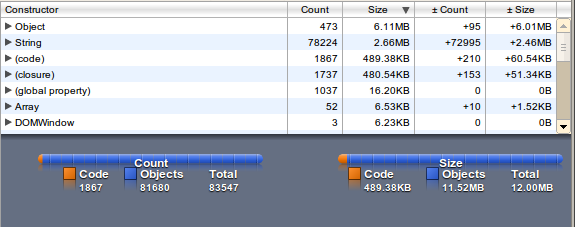
The memory usage is factor 10, the loading time factor 2 - but access to the words is quite fast (as expected).
wordlist as Trie
An trie is a special tree data structure for searching ASCII data (mostly for similar words). Every letter is one node and realized as a recursive Object. We can save the file size by stripping the " in key-names (if this letter is a valid variable name in JavaScript).
words.load("Trie", {a:{a:{h:{i:{n:{g:{$:1}}},s:{$:1},e:{d:{$:1}},$:1},l:{$:1}}},z:{y:{z:{z:{y:{v:{a:{s:{$:1}}}}}}},z:{z:{$:1}}}});
I run the Javascript unpacker and beautifier for better reading:
words.load("Trie", {
    a: {
        a: {
            h: {
                i: {
                    n: {
                        g: {
                            $: 1
                        }
                    }
                },
                s: {
                    $: 1
                },
                e: {
                    d: {
                        $: 1
                    }
                },
                $: 1
            },
            l: {
                $: 1
            }
        }
    },
    z: {
        y: {
            z: {
                z: {
                    y: {
                        v: {
                            a: {
                                s: {
                                    $: 1
                                }
                            }
                        }
                    }
                }
            }
        },
        z: {
            z: {
                $: 1
            }
        }
    }
});
As you see this is the complete normalized version and has some useless subtrees in the example with 7 words. The structure would be better with many similar words. There exists many generators which offers better tries (John Resig did some work).
filesize for English wordlist: 950 kB (gzip: 142 kB) - loading time: 237ms
filesize for German wordlist: 4016 kB (gzip: 464 kB)
Searching words in a trie (including the word stem) is O(m) (m is the maximum word length).
findInTrie: function (word) {
    var node = this.data.Trie;
    var result = "";
    for (var i = 0; i < word.length; i++) {
        if (node.$) result = word.substring(0, i);
        if (word[i] in node) node = node[word[i]];
        else
        return result;
    }
    return result;
}
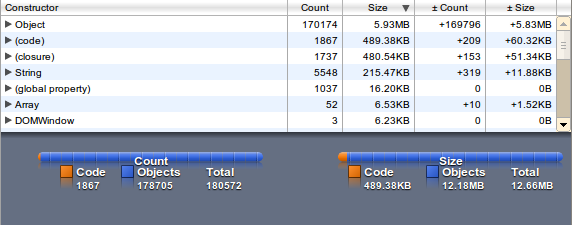
The memory usage is factor 8, the loading time factor 5 - but access to unknown words is quite fast (as expected).
Trie-variant
Depending on your wordlist the file size can decreased if the most used starting letter are used for the level-1 key.
words.load("Trie2", {
    aa: {
        hed: 1,
        h: 1,
        hing: 1,
        l: 1,
        hs: 1
    },
    zy: {
        zzyvas: 1
    },
    zz: {
        z: 1
    }
}, 2);
In the English wordlist with 74137 unique words is the optimal split after 3 letter, in the German wordlist with 327314 words after 8 letter.
filesize for English wordlist: 599 kB (gzip: 204 kB) - loading time: 69ms
filesize for German wordlist: 3273 kB (gzip: 991 kB)
Searching the word in this 2-level trie (including the word stem) is O(m) like the hashmap variant (m is the maximum word length).
findInTrie2: function(word) {
	var data = this.data.Trie2;
	while(word) {
	    var first = word.substring(0, this.opt.Trie2);
	    var second = word.substring(this.opt.Trie2);
	    //console.info("word: "+word);
	    if (word.length>this.opt.Trie2) {
		if (first in data && second in data[first])
		    return word;
            }
            else {
                if (first in data) return word;
            }
            word = word.substring(0, word.length-1)
        }
        return false;
    }
staticString, ordered by word length
This data structure is offered by Mathias Nater (hyphenator.js at http://code.google.com/p/hyphenator/). All words ordered by length and concatenated into strings.
words.load("StaticStr", {
    "8": "zyzzyvas",
    "3": "aahaalzzz", // three words concat
    "4": "aahs",
    "5": "aahed",
    "6": "aahing"
});
filesize for English wordlist: 588 kB (gzip: 241 kB) - loading time: 18ms
filesize for German wordlist: 4203 kB (gzip: 991kB)
Searching the word in the static string map is a binary search on the m entries and result in O(log n * m) .
findInStaticStr: function(word) {
	var data = this.data.StaticStr;
	var s, i, step;
	for (var len=word.length; len>1; len--)
	    if (len in data) {
		i = Math.floor(data[len].length/(len*2));
		jump = Math.ceil(i/2);
		while (jump) {
		    s = data[len].substring(i*len, i*len + len);
		    if (s===word) return word;
		    i = i + ((s<word)*2-1)*jump;
		    jump=(jump===1)?0:Math.ceil(jump/2);
		}
		s1 =  data[len].substring(i*len, (i+1)*len);
		s2 =  data[len].substring((i+1)*len, (i+2)*len);
		if (s1.length===len && word.indexOf(s1)===0) return s1;
		if (s2.length===len && word.indexOf(s2)===len) return s2;
	    }
    }
The file size, memory usage and loading time are better than the plain string (and the best in the competition). And the accessing time is fast enough. As you see this static string map variant dont make the heavy use of hashmaps and is the best solution for saving resources for mobile html apps.
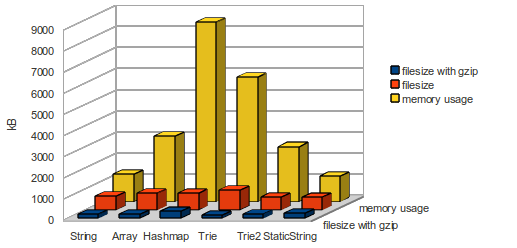
conclusion and live benchmarks
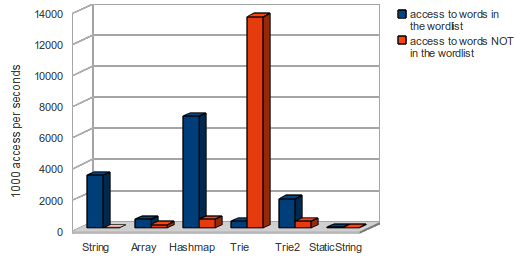
- a hashmap (or plain JavaScript Object) needs much more memory than the pure String
- with gzip the file size differs only from 142 kB to 325 kB
- the Trie data structure is perfect for finding words which are not in the wordlist.
- the hashmap and the string variant (with indexOf) is fine with known words in the wordlist
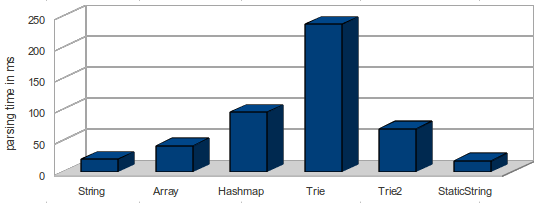
Parsing time on a Core I7 is significant - so it will on a mobile parser a NO-GO!
I included the benchmarking page as an iframe - feel free to load and run the benchmarks. Open your JavaScript console to see some debugging lines or play with the global words-object. The code can found at http://pyunitedcoders.appspot.com/words.js.
10 one-line solutions for project euler
What are one-line solutions?
Solving an problem from project euler can be a challenge or coding fun. The result of every problem is only one number, calculated by an algorithm. Some algorithms can be written as one expression. You get an one-liner if you can embed it in a function with only one line of code.
What is Project Euler?
Project Euler is a series of challenging mathematical/computer programming problems that will require more than just mathematical insights to solve. Although mathematics will help you arrive at elegant and efficient methods, the use of a computer and programming skills will be required to solve most problems.
After solving some project euler problems with python I got some one-line solutions with nice usage of list comprehensions and functional programming. These code examples are not clean code but a challenge to find more one-line solutions. This article include my first 10 solutions for project euler as one-line python function. Dont use it to cheating the project – it should be a motivation to find smart coding solutions and participate to project euler.
Project euler – Problem 1 solution
If we list all the natural numbers below 10 that are multiples of 3 or 5, we get 3, 5, 6 and 9. The sum of these multiples is 23.
Find the sum of all the multiples of 3 or 5 below 1000.
def task1():
    return sum(filter(lambda x:x%3==0 or x%5==0, list(range(1,1000))))
The version as list comprehension look similar:
def task1():
    return sum([x for x in range(1,1000) if x%3==0 or x%5==0])
I found a ruby one-liner for problem 1 on cslife.wordpress.com.
Project euler – Problem 6 solution
The sum of the squares of the first ten natural numbers is:
12 + 22 + ... + 10^2 = 385
.
The square of the sum of the first ten natural numbers is:
(1 + 2 + ... + 10)2 = 55^2 = 3025
Hence the difference between the sum of the squares of the first ten natural numbers and the square of the sum is
3025 - 385 = 2640
.
Find the difference between the sum of the squares of the first one hundred natural numbers and the square of the sum.
def task6():
    return sum(range(1,101)) ** 2 - sum([x*x for x in range(1,101)])
I found a groovy one-liner on jared.cacurak.com and the correct O(1) solution on basildoncoder.com (as comment ) and shaunabram.com.
Project euler – Problem 8 solution
Find the greatest product of five consecutive digits in the given 1000-digit number (given as string).
def task8(n):
    return max([int(n[i])*int(n[i+1])*int(n[i+2])*int(n[i+3])*int(n[i+4]) for i in range(len(n)-5)])
I generated a list of all products for five consecutive digits and used
max
to find the greatest number in the list.
On scrollingtext.org are many comments with different solutions and on codesnippt.com is my brute-force solution.
Project euler – Problem 9 solution
Pythagorean triplet is a set of three natural numbers,
a < b < c
, for which
a^2 + b^2 = c^2
.
For example:
3^2 + 4^2 = 9 + 16 = 25 = 5^2
.
There exists exactly one Pythagorean triplet for which
a + b + c = 1000
.
Find the product
a * b * c
.
def task9():
    return [a*b*c for a in range(1,1000) for b in range(1,1000) for c in [1000-b-a] if a*a+b*b==c*c and a<b and b<c][0]
Multi-dimension loops can generated by more for-statements in a list comprehension. This can also solved by pen and paper – see the euler project forum after submit the solution. Or read the answers on stackoverflow.com with the correct mathematical solution.
Project euler – Problem 13 solution
Work out the first ten digits of the sum of the following one-hundred 50-digit numbers.
def task13(listOfNumbers):
    return str(sum(listOfNumbers))[:10]
There is no limit of the digit-length from an integer in python – problem solved fast. If your language dont support long integer use only the first 12 digits to solve the problem. The same solution found on blog.dreamshire.com and stefanoricciardi.com in F#.
Project euler – Problem 16 solution
2^15 = 32768
and the sum of its digits is
3 + 2 + 7 + 6 + 8 = 26
.
What is the sum of the digits of the number
2^1000
?
def task16():
    return sum([int(x) for x in str(2**1000)])
My solution in python (but commented) found at realultimateprogramming.blogspot.com or stackoverflow.com.
Project euler – Problem 19 solution
How many Sundays fell on the first of the month during the twentieth century (1 Jan 1901 to 31 Dec 2000)?
My first solution was straight-forward:
def task19():
    c = 0
    for year in range(1901, 2001):
        for month in range(1, 13):
            c += datetime.datetime(year,month, 1).weekday()==6
    return c
This can be converted in an one-liner, but the truly short solution look like this:
def task19():
    return 100*12/7
Project euler – Problem 20 solution
Find the sum of the digits in the number 100! (=
factorial(100)
).
def task20():
    return sum([int(x) for x in list(str(math.factorial(100)))])
There is a small cheat – you have to include the math-module. But the stand-alone solution works too:
def task20():
    return sum([int(x) for x in str(reduce(lambda a,b:a*b, range(1,101)))])
I found an one-liner on theburningmonk.com in F#.
Project euler – Problem 25 solution
What is the first term in the Fibonacci sequence to contain 1000 digits?
My first solution is the classic non-recursive solution with only three variables.
def task25(self):
    '''What is the first term in the Fibonacci sequence to contain 1000 digits?'''
    a1 = 1
    a2 = 1
    n = 3
    while 1:
        a1 = a1 + a2
        if len(str(a1))==1000:
            return n
        n += 1

        a2 = a1 + a2
        if len(str(a2))==1000:
            return n
        n += 1
Looks like clean code and performance optimized. The one-line solution have to generate the fibonacci numbers in a list and stop if the 1000-digits member of the fibonacci sequence is reached.
def task25():
    return 1+len(reduce(lambda a,b:len(str(a[-1]))==1000 and a or a.append(a[-2]+a[-1]) or a,range(5000),[1,2]))
Using
reduce
without reducing is not fine – but a one-line solution. And it’s brute-force – step back to your mathematical knowhow: Fibonacci terms converge to
(n)*Phi=(n+1)
, where Phi is the Golden Ratio:
(1+sqrt(5))/2
– detailed description can found on geekality.net.
def task25():
    return int(math.floor( (1000 - 1 + math.log10(math.sqrt(5))) / math.log10((1+math.sqrt(5))/2)))
I found an one-liner on sharp.it in F#.
Project euler – Problem 29 solution
Consider all integer combinations of
a*b
for 2 <= a <= 5 and 2 <= b =1024
5^2=25, 5^3=125, 5^4=625, 5^5=3125
If they are then placed in numerical order, with any repeats removed, we get the following sequence of 15 distinct terms:
4, 8, 9, 16, 25, 27, 32, 64, 81, 125, 243, 256, 625, 1024, 3125
.
How many distinct terms are in the sequence generated by
a * b
for
2 <= a <= 100
and
2 <= b <= 100
?
I have to generate all combinations for the
a^b
and put it into a set to eliminate the duplicates.
def task29():
        res = set()
        for a in range(2, 101):
            for b in range(2, 101):
                res.add(a**b)
        return len(list(res))
I used the same trick like in problem 9. Starting an two-dimensional list-comprehension, converting all products in a python-set to remove the duplicates and counting the elements in the set.
def task29():
    return len(set([a**b for a in range(2,101) for b in range(2,101)]))
other solutions
If you have other one-line solution and/or in other programming languages feel free to comment or link your blogs. Next year I will post the next 10 solutions.
Happy new Year!
Javascript algorithm performance : And the winner is …
Our little programming contest was fun and we can learn something about best practices in javascript algorithm performance. I have prepared some micro benchmarks for common code sniplets to find the best variant. After the section with the micro benchmarks you can find the best-performed solution by running the JSLitmus test and browse through the javascript code. And yes – our co-author Matthias had the best solution with factor 20-35 faster than the clean code variant. No solution is close with the performance to Matthias’ solution!
Knowing some javascript performance hints are importend. The different javascript interpreter with Just-In-Time-Optimizer can offer some surprise in the following basic code examples.
- Adding Numbers to an Array
- Using code in loop-header or Body
- Round down a Number
- Using linear Array or Object (=hashmap) for caching Numbers
- Find a substring in a String
Adding Numbers to a Array
The clean code solution forced you to use the push-method to add a number to the Array. Is this the best way?
benchArrayPush = function(count) {
    var a = [];
    while (count--) a.push(count);
};
benchArrayLength = function(count) {
    var a = [];
    while (count--) a[a.length] = count;
};
benchArrayLocal = function(count) {
    var a=[], l=0;
    while (count--) a[l++] = count;
};
benchArrayFixedLocal = function(count) {
    var a=new Array(count), l=0;
    while (count--) a[l++] = count;
};
-
Array.push
is only in Chrome faster than the other variants
- Using a local variable as index instead of the
Array.length
attribute is in opera and FF 3.6 faster
- Why is defining a Array with the end length slower than
Array.push
in Chome?
conclusion: The variant with using
Array.length
has good performance and dont need an extra variable. One point for clean code!
Using code in loop-header
Instead of call all operation in the body of a loop, you can put simple operation in the head of a loop. This is not clean code, but all operation can seperated by a “,”. Is there an optimizer who accept this coding style as performant?
benchLoopHeader = function(count) {
    var i,j,i1=0,i2=0,i3=0,i4=0,i5=0,i6=0,i7=0,i8=0,i9=0, sum=0;
    for (j=10;j;j--)
        for (i=count; i; i1++,i2++,i3++,i4++,i5++,i6++,i7++,i8++,i9++,i--)
            sum++;
};
benchLoopBody = function(count) {
    var i,j,i1=0,i2=0,i3=0,i4=0,i5=0,i6=0,i7=0,i8=0,i9=0, sum=0;
    for (j=10;j;j--)
        for (i=count; i; i--) {
            i1++;
            i2++;
            i3++;
            i4++;
            i5++;
            i6++;
            i7++;
            i8++;
            i9++;
            sum++;
        }
};
benchLoopLine = function(count) {
    var i,j,i1=0,i2=0,i3=0,i4=0,i5=0,i6=0,i7=0,i8=0,i9=0, sum=0;
    for (j=10;j;j--)
        for (i=count; i; i--) {
            i1++;i2++;i3++;i4++;i5++;i6++;i7++;i8++;i9++;sum++;
        }
};
conclusion: The loop body solution has no performance problems comparing with the other variants. You can use the clean coding style – second point !
Round down a Number
The
Math.floor
function is defined to round down and
Math.ceil
for rounding up. But are these function the best choice?
benchIntegerFloor = function(count) {
    var i = 7.7, r;
    while (count--) r = Math.floor(i);
};
benchIntegerParseInt = function(count) {
    var i = 7.7, r;
    while(count--) r = parseInt(i);
};
benchIntegerParse10 = function(count) {
    var i = 7.7, r;
    while(count--) r = parseInt(i, 10);
};
benchIntegerBinaryOr = function(count) {
    var i = 7.7, r;
    while(count--) r = i|0;
};
- Using
parseInt
force the javascript interpreter to cast the Number to a String before parsing – this is slow!
- If you use the bitwise OR all browser are very fast to convert it into an 32 bit integer. If your Number is greater than 2^32 the OR-variant will fail.
Conclusion: if your Number range use only 32-bit values (like in the contest) bitwise OR is the fast option, but not clean code. 1 point against clean-code.
Using Array or Object for caching Number results
For the pre-calculated results is an Array the right container as Cache – or is the standard JavaScript Object better?
benchCacheArray = function(count) {
    var a=[], i, j, c;
    for (i=count/2; i; i--) a[i]=i;
    for (i=count/2; i; i--) c = a[i];
};
benchCacheObject = function(count) {
    var a={}, i, j, c;
    for (i=count/2; i; i--) a[i]=i;
    for (i=count/2; i; i--) c = a[i];
};
- Opera / Chrome are factor 6 faster than FF while accessing Object or Array!
- There is no better performance from FF 3.6 to FF 4
- Chrome has optimized the Array access with Numbers
conclusion: Using an Array for cached Number results is Ok, but the hashmap/Object variant is fast, too! Next point for clean code!
Find a substring in a String
What is the fastest method to find a substring in an given String? Many commentators used the
String.indexOf
-method, only one anonymous writer used the
RegExp("7")
constructor.
benchStringMatch = function(count) {
    var seven = "12734", res;
    while (count--) res = seven.match(/7/);
};
benchStringRegExTest = function(count) {
    var seven = "12734", res, hasSeven = new RegExp("7");
    while (count--) res = hasSeven.test(seven);
};
benchStringIndexOf = function(count) {
    var seven = "12734", res;
    while (count--) res = seven.indexOf("7")!==1;
};
-
String.match
is factor 3 -10 slower than a predefined
RegExp
Object.
- the
String.indexOf
method is in both Firefox very fast
- to find one substring in many Strings the RegExp Object is in Opera / Chrome faster than
String.indexOf
conclusion: Find the best variant for your usage. Or use browser-optimized code between FF/Chrome – one point against clean code.
Check the best solution for the game of forfeit
Tipp: Maximize your browser because the javascript code has fixed font width.
clean code in JavaScript
Good news for JavaScript number cruncher. Your performance depends on your algorithm and not on cryptic hacks in JavaScript!
forfeit game – ALGOL 60 solution from 1964
I found two ALGOL sniplets for the forfeit game contest. My ALGOL 60 programming book (happy birthday for the ALGOL programming language) offer for every problem the question, a problem analysis, a code structure chart, the code solution and the executing time for the ZUSE 23 computer (see a very similar Z22 on wikipedia). I converted the fast solution for the game of forfeit from ALGOL to javascript without optimizations and benchmarked it.
Opera 10.63 vs. Chrome 7/8 vs. Firefox 3.6.12/4b7
I will start with the results from the converted ALGOL solution. The new javascript engine Jägermonkey with the firefox 4b7 is a real competitor for other fast javascript engines! And the ALGOL version is (mostly) better than the clean code version. The absolute numbers are generated on my own mini-pc and used for comparing with the clean code solution.
The 1:1 conversion of the ALGOL code runs on my Intel Atom N270 3.5 million times faster than on the original ZUSE Z23.
get ALGOL working on your box
How can I start ALGOL code on my local ubuntu? And not the more popular ALGOL 68? There is only one working interpreter: the NASE A60 interpreter from Erik Schoenfelder. Extract the archive, run
./configure
and start your algol code directly.
More background to the z23 on egge.net:
-
The 1961 Zuse Z-23 was his eighth model, being a transistorised version of the 1956 valve based Z22. His previous computers had used relays! A typical Z22 had 14 words of 38-bit core RAM, 8192 word (38 KB) magnetic drum, punched card I/O, it ran at just 3 KiloHz!! And – oh wonders – by 1958 there was an ALGOL 58 compiler for it !!!
fastest solution
This solution from H.Lehr was the fastest solution. Its not working for all number ranges and there is no defined break. It needs 6 minuts and 17 seconds for calculating and printing on the original hardware. If you are not familiar with ALGOL 60 some tips:
-
ENTIER
function rounds down a floating number to an integer
- all keywords are wrapped by single quotes, variable names not
- code blocks start with
BEGIN
and end with
END
instead of { and }
-
A:
is a label and you can direct jump to the line with the
GOTO
keyword.
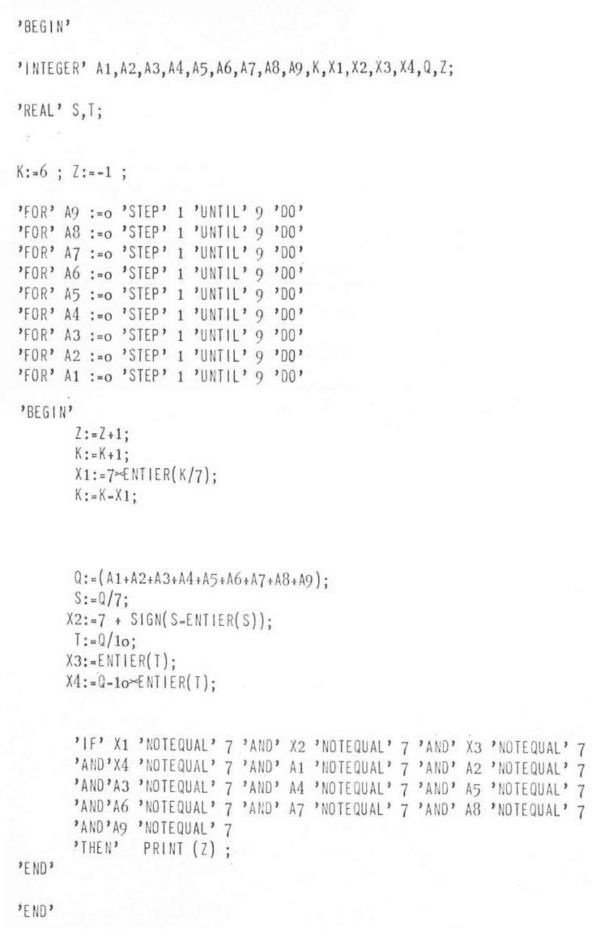
The usage of multiple for-loops to check each digit of the number with 7, instead of generating a string, is a limited but a creative solution. And the sum of all digits is directly accessable! The next interessting point: The maximal value for the sum of digits for example
n=1.000.000
is
54
– we dont need complex checks for this number. In the ALGOL example only
X1
to
X4
are used for these checks.
Converting ALGOL to javascript
This works fine and I converted it to javascript (without changes), but it doesn’t perform like excepted. But this code can be an inspiration to get better performance boost for the solution of the forfeits game contest.
function forfeits(n) {
	var k=6, x1, x2, x3, x4, q, z=-1, s, t, result=[];
	for (var a9=0; a9<10; a9++)
	for (var a8=0; a8<10; a8++)
	for (var a7=0; a7<10; a7++)
	for (var a6=0; a6<10; a6++)
	for (var a5=0; a5<10; a5++)
	for (var a4=0; a4<10; a4++)
	for (var a3=0; a3<10; a3++)
	for (var a2=0; a2<10; a2++)
        for (var a1=0; a1<10; a1++) {
	    z++;
	    k++;
	    x1 = 7 * entier(k/7);
	    k = k - x1;
	    q = (a1+a2+a3+a4+a5+a6+a7+a8+a9);
	    s = q/7;
	    x2 = 7+sign(s-entier(s));
	    t = q/10;
	    x3 = entier(t);
	    x4 = q-10*entier(t);
	    if (x1!==7 && x2!==7 && x3!==7 && x4!==7 &&
		a1!==7 && a2!==7 && a3!==7 && a4!==7 && a5!==7 &&
		a6!==7 && a7!==7 && a8!==7 && a9!==7) result.push(z);

	    if (z === n) return result;
	}

	//transfers an expression of real type to one of integer type, and assigns
	//to it the value which is the largest integer not greater than the value of E
	function entier(e) {
	    return Math.floor(e);
	}
	//the sign of the value of E (+1 for E < 0, 0 for E=0, -1 for E < 0).
	function sign(e) {
	    return (e<0)?1:(e>0)?-1:0;
	}
    }
Simple test it in your browser:
elegant solution
The second solution printed in the book is from R. Wagner and the calculating/printing time was 7 minuts and 53 seconds.
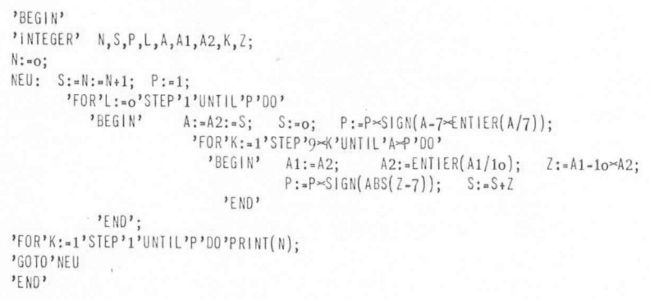
This doen’ t work with the a60 interpreter and I have no idea what’s is wrong. Feel free to get it running in the a60 interpreter or use the exmaple for a javascript version.